My suggestion is at the end, vote if you think it’s a good idea, first let’s see how this works. For now, as far as I know. There are two ways to split or join windows:
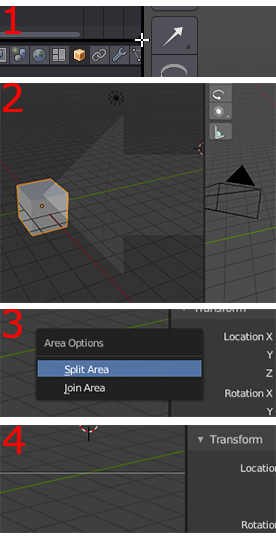
Left click window corner :
Split
When reaching the corner of a window, the cursor become a cross, then user will drag out new window (Figure 1)
Join
or an arrow will appear to decide which direction to collapse to. (Figure 2)
Right click window border :
Split
Right click the border of a window and choose between 2 options, a line will appear if split area is chosen, the line will be used to split the window. (Figure 3&4)
Join
And join area will be similar to left click drag corner
My thoughts and suggestion:
In 2.8 every window areas look much better. But when it comes to click the corner, it’s rather easy to misclick some buttons around the corner. Also in my opinion as a newbie blender user, join or split windows from a corner is not very self-explanatory since the corner can go any directions.
So my suggestion is to make use of the right click but not just to show 2 options as before. We can right click the border of a window and drag to join or split, just like how left click and dragging corner works. This way users have a nature idea which way the window will go, it’s either up down or left right since you are moving the border. Also there won’t be any misclick of buttons.