Here is what I think is important for the keymap (just my 2 cents):
Avoid conflicts with hotkeys that are accepted as standard everywhere e.g.:
ESC (cancel, stop, exit), Enter (execute, confirm, open), Ctrl+C/V (copy/paste), LMB (select ), etc.
Keep it minimal. I think the Minimal Keymap concept is very important for Blender. It gives a choice and freedom to the users to make their own workflow more efficient.
In the studios I’ve worked in many people had their own keys, scripts, marking menus (pie menus) for doing the things they do most often. For example modelers and animators can use the same key for different features.
As customizable as possible. Avoid hard coding hotkeys / mouse buttons. All (where possible) features/operators should be exposed to the end user for assigning their own keys/mouse buttons. This I guess is very difficult to do for some cases, but I think it can save a lot of trouble in the future buy giving users the freedom to decide by themselves, instead of arguing for decades about right/left click and bother developers with it.
Blender needs a visual Pie Menu editor (Maya has one since forever) and better hotkey editor, maybe something like this.
Yeah, that could be great! but blender has so many functions that the shortcuts are contextual, they change depending on mode and the type of the object, I think would still be overwelming to map everything on a visual keyboard like this.
This seems to me like a feedback loop which causes the problem it attempts to fix.
Someone always wants to change something, maybe there’s a shortcut missing, or they just don’t want to relearn their shortcuts, so those people add their own keys, then they complain it’s difficult to do, so more keys are taken off the default keymap in an effort to make it more ‘minimal’ and clear space for these people. So now more people have to reassign keys because their functions are gone from the keymap, and all of them do so differently, then those (now more) people complain it’s difficult to assign keys, then more keys are taken off the keymap… you get the idea.
It feels like this common practice of people all using separate keymaps comes about because a fast and fully functional keymap might not exist, the software assumes you’ll create your own, so when people start speeding up, they do. But they all do it differently, and so they diverge and you have a mishmash of keymaps, and no two people in a studio can swap computers for a minute to do anything, all common ground is lost.
Surely if there existed a powerful default keymap that wall fully fledged and fast, there would be minimal need to alter it. And if the keys were easily editable, conflicts were easy to detect, then surely the keymap being full of keys isn’t a barrier to modifying the keymap because any key you don’t use you can find and rebind anyway. I feel like the 2.79 keymap and previous took this approach, but it got shafted because it’s difficult to learn, and there’s always those people who just want to customise it because they have their own way.
I guess I just don’t get why the default keymap didn’t stay as functional as possible, whilst a new ‘minimal’ keymap was added, filling the role of being a base onto which users could create their own keymaps. We’re somewhere inbetween those two with the default in 2.8.
I agree very much with this. One of Blender’s big advantages in terms of workflow always was the blazing fast keyboard-oriented design. I can model in Blender probably 5 times faster than in Maya. And speaking of Maya, the double-click to select edge loops is very awkward with a wacom tablet (which is what I use 90% of the time for any task), and slows down the workflow.
I hope that going forward, the efficiency of the Blender keymap won’t be sacrificed for the sole purpose of attracting new users.
It is currently quite difficult to spot hotkeys modifications in the keymap interface. Of course, there is a button (on the right) with an arrow to show modified hotkeys but I think that it would be more obvious to know which one has been changed with a colorful button:
could u guys expose Axis locking MMB when rotating to the input editor, there are many other modal ones that are hard-coded.
aslo Alt Gr(aph) is broken for view locking, as a left handed user i have to shift most of the keymap to the right-side to work with.
thank you.
Is it possible for a classic keymap to reduce all context menus to “W”? For uniformity.
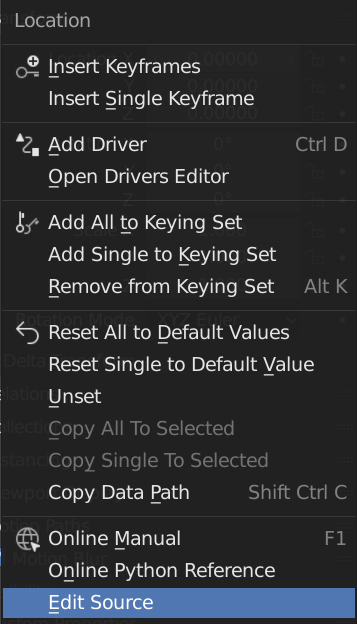
When you hover over an parameter (e.g. location), pressing “I” sets all the keys (“insert keyframes”).
What if, for example, Ctrl+I (or Ctrl+right mouse button) would install only one key (“insert single keyframe”)?
And also transfer the “lock” to the context menu, + assign a combination, for example Ctrl+L.
At the same time, give the opportunity to hide the installation widgets of single keys and lock’s. To be able to unload the already overloaded UI.
In the absence of a lock icon, locked parameters can be color coded.
X - locked
X,Y,Z - locked
I understand that now is not up to it, and most users will not like this, but nevertheless, the possibility of facilitating the interface will not be an unnecessary option for the future.
upd.:
My English is very bad, so I’ll clarify. I do not propose to completely remove the key installation button and the lock button, but only to enable them to be disabled from the settings so that those users who find these extra elements interfering with normal operation have the opportunity to get rid of them in order to use the screen space more intelligently.
What about OPPORTUNITIES to disable buttons for setting animation keys (rhombuses to the right of animated fields), and add keyboard shortcuts for this?
So that users have the opportunity to simplify the interface.
 ), etc.